Skip to content
Version 1 MIT Licensed

Visual SQL Lineage inside VS Code

Understand impact, lineage, and SQL dependencies faster. Build interactive maps from DACPACs or live Microsoft SQL metadata without leaving VS Code.

Free core experience · MIT Licensed · Optional Copilot AI

Loading Preview...
Complexity

Untangle long SQL chains, inherited models, and undocumented reporting logic without manual tracing.

Risk

Check downstream impact before you change a table, view, or reporting calculation.

Clarity

Stay in VS Code with a local-first graph that makes architectural intent easier to inspect and explain.

Core Workflow.

Move from question to impact analysis without leaving VS Code.

Discovery

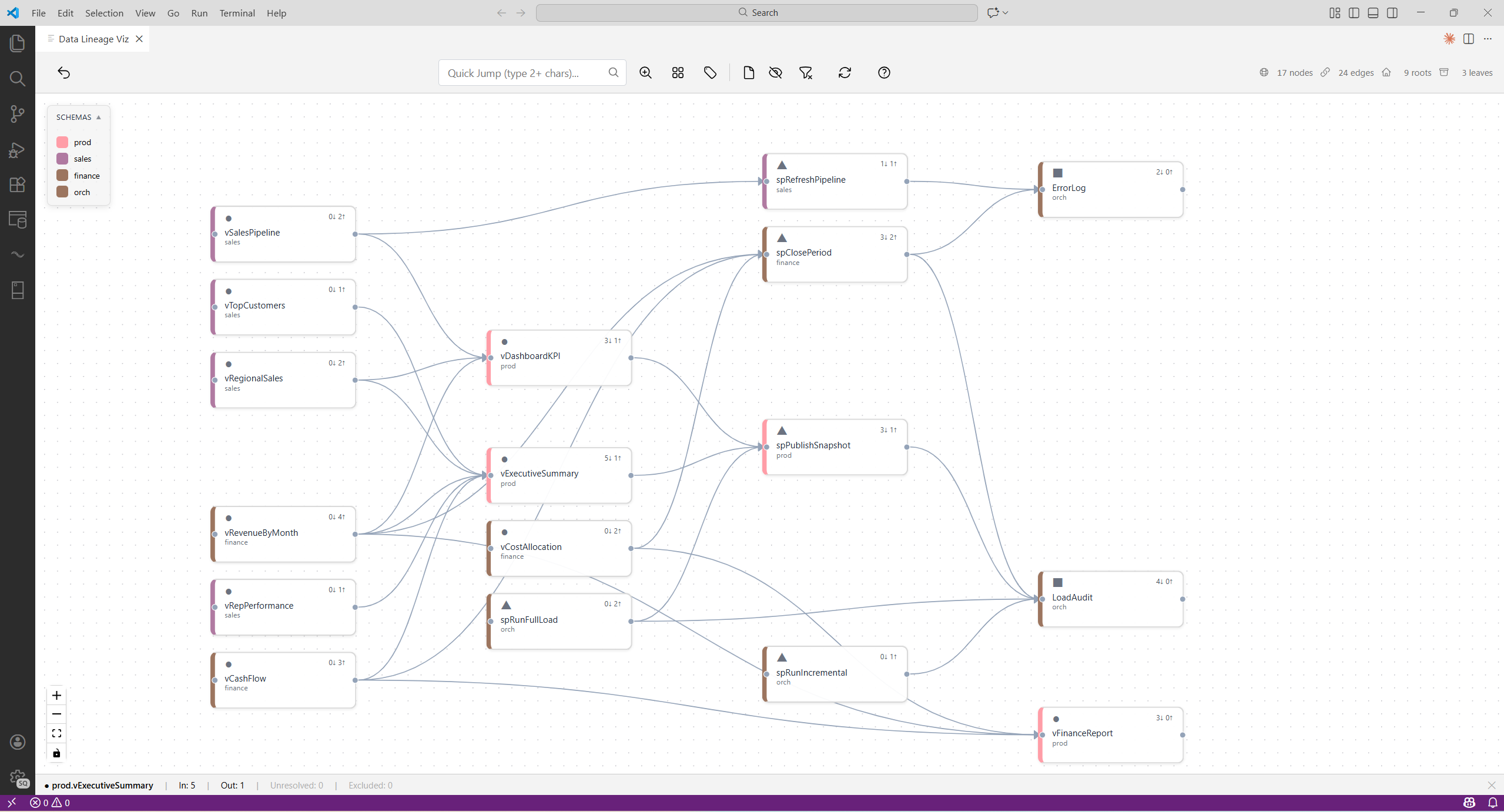
Impact Analysis & Tracing

Spot risky dependencies, hidden hubs, and isolated objects before a change reaches production.

  • Trace upstream and downstream dependencies
  • Find the shortest path between objects
  • Switch large graphs into schema-level view when scale demands it
Graph Interface
Search and Preview
Efficiency

Integrated SQL Context

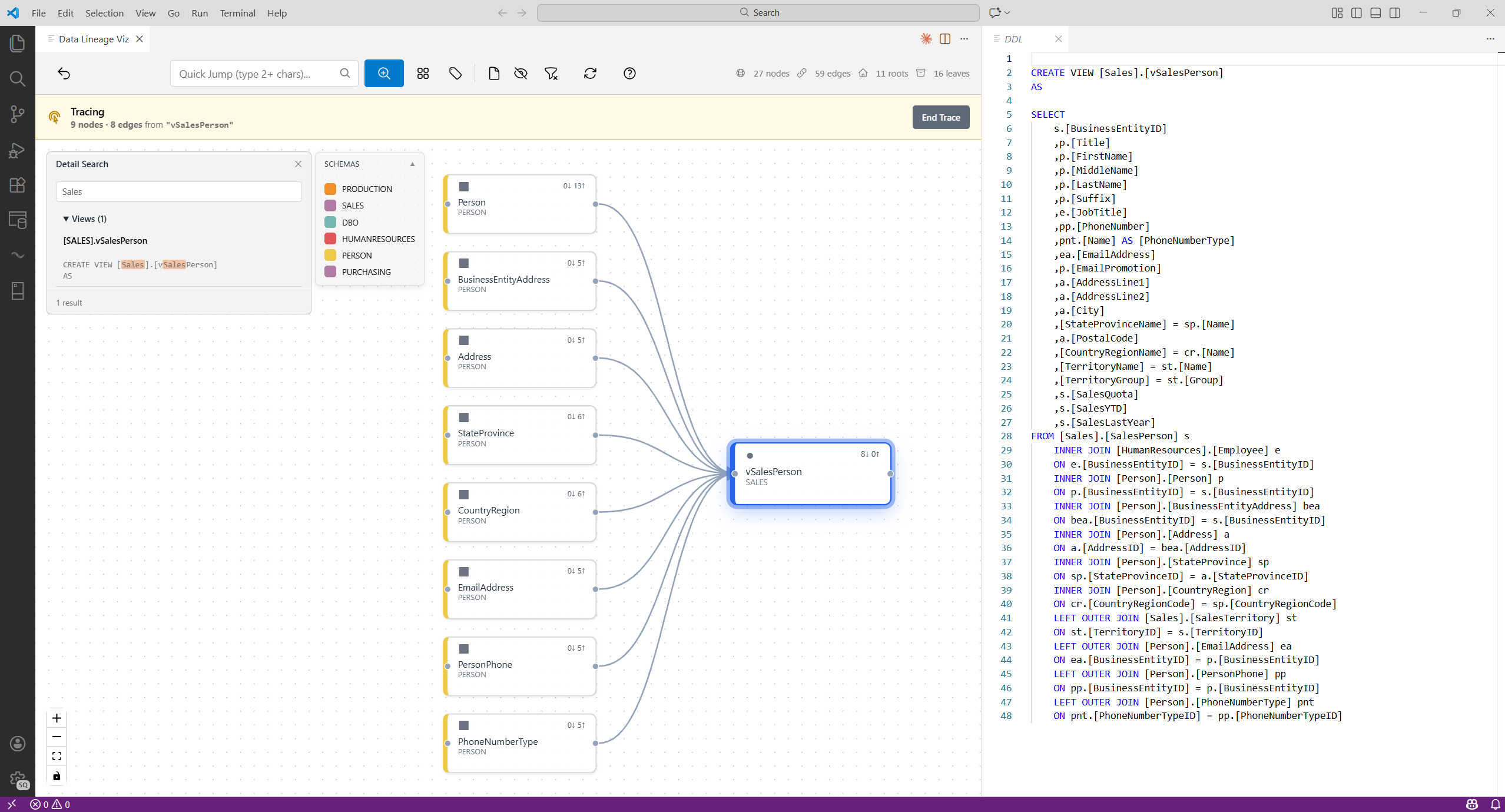
Keep the SQL beside the graph so you can verify logic faster and document decisions while you work.

  • Open DDL on demand with syntax highlighting
  • Search across stored procedures, views, and functions
  • Export clean diagrams to Draw.io

Schema Overview

Start large estates in schema view so the graph stays readable and responsive.

Enterprise Scale

Table Profiling

Run safe aggregate checks on live tables when you need a quick sanity check before deeper analysis.

Database Import Only

Advanced Discovery

Save views, keep filters, and revisit important paths without rebuilding context.

Persistence & Navigation

Customizable

Adjust parse and AI behavior with workspace settings and YAML-based templates.

Open Architecture

How It Works.

Local extraction, graph traversal, and optional AI guidance designed for large SQL estates.

1

Connect or Load

Securely extract metadata from local .dacpac files offline, or connect to live MS SQL projects via standard DMVs.

2

SQL Parsing Pipeline

A staged parser extracts references from T-SQL bodies while filtering strings, comments, and noisy syntax patterns.

3

Graph Traversal Engine

Graphology plus deterministic BFS powers fast dependency traversal, scope discovery, and path finding.

4

Bounded AI Context

When AI is enabled, the assistant works from bounded metadata summaries so longer traces stay explainable without losing control.

Optional Copilot analysis.

AI discovery.

When GitHub Copilot is enabled, @lineage answers business or technical questions from the loaded model and sends you back into a graph you can keep exploring.

Question-Driven Discovery

Ask direct questions about formulas, dependencies, impact, and reporting logic.

Grounded Exploration

The assistant works from your loaded metadata, not from generic SQL guesses.

Graph-First Follow-Up

Keep exploring the returned graph with search, trace tools, and saved views inside the same workflow.

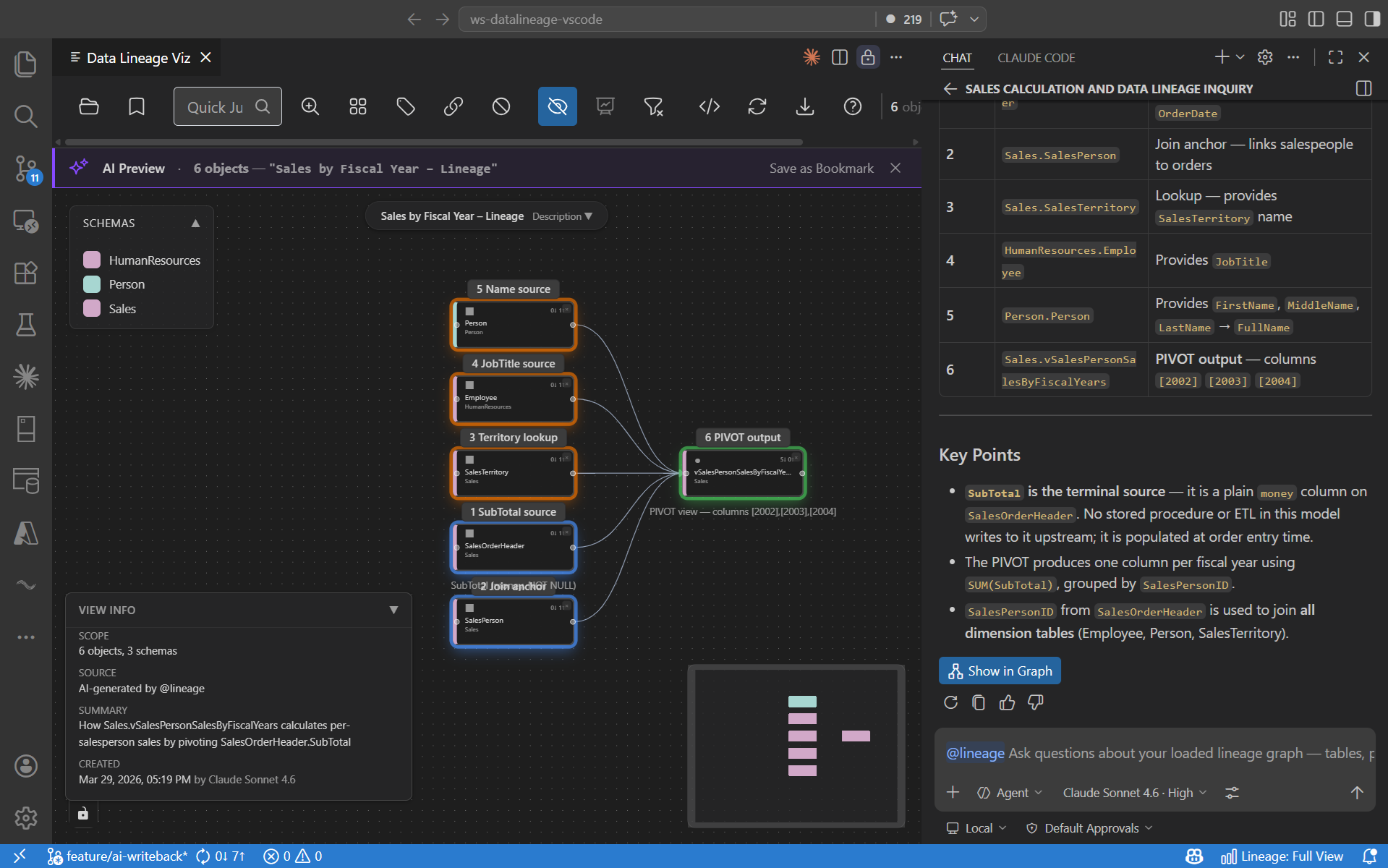
In-Graph Result View Representative example
Representative AI result view inside the lineage graph

A representative AI result inside the graph: linked objects, summarized findings, and visual context you can keep exploring after the answer is generated.

Copilot Question Flow

Ask @lineage in Copilot Chat

Recorded example prompt:

@lineage How is total revenue calculated in the fact sales report.
Loading Copilot Demo...

Requires GitHub Copilot & VS Code 1.95+ · Core graph exploration remains local and available without AI

Local Execution & Control

  • Local Execution Graph building and core lineage analysis run locally against metadata and DDL.
  • Safe Profiling Row-level data is accessed only if you explicitly start Table Profiling. Profiling uses aggregate queries and safe row sampling.
  • Full Customization Adjust parsing, profiling, and AI behavior with simple YAML templates in your workspace.
  • Auditability Review the published SQL contract to see exactly which queries are used.
dataLineageViz.ai.enabled: false
dataLineageViz.tableStatistics.enabled: false

Scope & Limitations

  • Object-Level Focus The tool maps dependencies between Tables, Views, and Stored Procedures. It does not support attribute-level lineage as a core feature.
  • Single Project Analysis is scoped to one database connection or DACPAC file at a time. It does not perform cross-project or multi-server traces.
  • No External ETL It does not trace external orchestrators like Azure Data Factory, Spark jobs, or SSIS pipelines that reside outside the SQL DDL.
  • Static Resolution Analysis is performed against compile-time metadata. Dynamic SQL and references without schema prefixes are excluded.

Frequently Asked Questions.

Does this send my database schema to the cloud?

No. DDL extraction, graph rendering, and core lineage analysis stay local. If you enable the optional AI features, only the metadata needed for the current answer is sent to your configured GitHub Copilot endpoint.

Is my row-level data accessed or transmitted?

Lineage tracing and AI analysis use compile-time metadata and DDL. Row-level data is accessed only if you manually trigger Table Profiling, and no row-level data is sent to the AI.

What SQL dialects are supported?

The engine is natively optimized for Microsoft SQL Server, Azure SQL Database, Microsoft Fabric DW, and Azure Synapse Analytics.

How does it handle large database architectures?

Architectures exceeding your configured threshold automatically trigger "Schema Overview" mode, collapsing objects into manageable schema bubbles to prevent UI lag. For deep dependency chains, the AI utilizes a bounded "Sliding Memory" window to process traces without context exhaustion.

Can I customize the parsing rules?

Yes. The extraction engine is fully metadata-driven. You can override T-SQL regex parsing rules, profiling statistics patterns, and AI generation prompts using local YAML templates within your workspace.


Christian Wagner

About the Creator

Built by Christian Wagner, a data warehousing and engineering practitioner working across SQL Server, Synapse, Fabric, and Azure-based analytics platforms.

The goal is simple: make SQL lineage easier to inspect, explain, and improve inside the tools teams already use. Feedback, bug reports, and practical product ideas are always welcome.

Connect on LinkedIn
Install Extension